
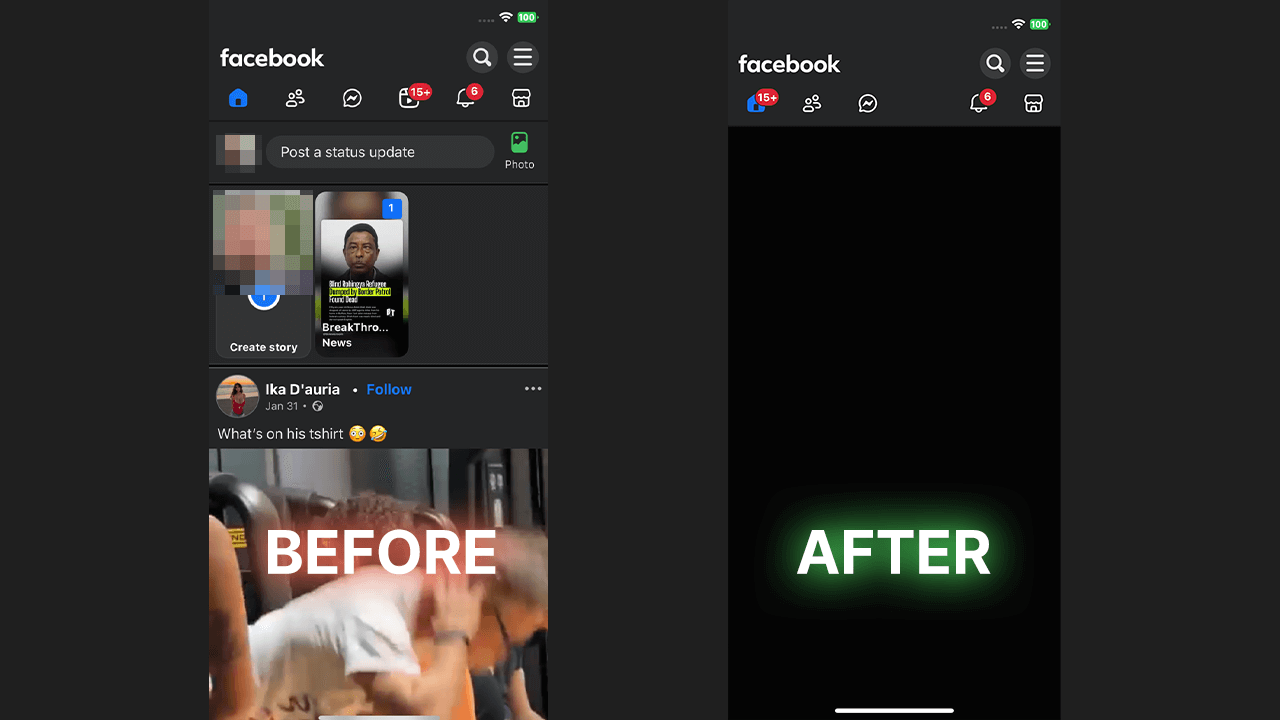
When you open the facebook app, you probably just want to check updates from friends. But Meta wants users to create and share as well as consume endlessly. They built a system designed for people to create and share short-form videos, turning your timeline into a trap. As you scroll through your feed, you are bombarded by one reel after another. If you are tired of this and want to get rid of facebook reels, you are not alone. Many people on reddit are asking for a way to completely remove facebook reels because these reels and short videos ruin productivity. If you want to learn how to disable reels, keep reading to find the best solution for ios.
The Illusion of Native Control
You might think there is an easy way to turn them off natively or simply turn off reels. But there’s no way to permanently stop seeing reels using the official settings. Sure, although you can’t completely remove them, the platform gives you the illusion of control. When you find the reels you don’t like or if you want to remove them, you can tap the three dots (or tap the three-dot menu usually in the top-right corner of the reel you want to hide). From there, you can choose to hide a reel or tell the algorithm you want to see fewer reels.
Hiding individual reels or hiding unwanted reels might temporarily stop reels from certain creators or reels from specific people, but it won’t permanently remove all reels on your facebook. The algorithm will just replace them with other reels you don’t want. You might even wish you could scroll to the bottom and click remove tab, but you cannot hide all reels on facebook this way. You will still see your reels tab, and future reels will keep showing up.
Autoplay Issues and the Mobile Problem
Another annoyance is when videos on facebook play automatically. You can go into settings to stop autoplay videos and prevent reels from autoplaying, but that doesn’t remove the facebook reels themselves. You will still see reels everywhere. On an android phone, some users try to download old unpatched APKs to get rid of reels or entirely block reels on facebook. But if you are using an iphone or an ipad, downgrading the facebook app on your mobile is impossible. You can’t just hack your way to completely remove reels. And if you try to access facebook via a mobile web browser or the desktop facebook website, the facebook feed is still full of them. Natively, there is no way to permanently hide them or truly permanently hide all reels.
The Ultimate Solution: WallHabit
To truly disable facebook reels and fix your facebook account, you need WallHabit. WallHabit is a commitment device specifically built to combat the subtle, addictive design of social media. It offers the only reliable method to remove reels and keep facebook reels from your feed. Instead of struggling to remove or hide every single reel, WallHabit gives you a flexible approach.
For everyday browsing, you can use facebook through our “Distraction-Free” environment. This version completely removes the short video features, so you experience facebook without the addictive infinite scroll. It will effectively disable reels on facebook and stop reels on facebook from ruining your day. You get a clean feed, and you can stop seeing reels on facebook entirely. This means you see fewer distractions and absolutely zero unwanted reels.
The “Tap to Unlock” Challenge
But what if you need the original app to manage a group or share your reels for work? You can keep your native facebook app installed but optionally locked behind WallHabit’s rigorous “Tap to unlock” challenge. To open it, you must physically tap the screen hundreds of times (for example, 300 taps) without stopping. If you pause, the counter resets. This friction ensures you only use the standard app when absolutely necessary. It’s the ultimate way to stop mindless scrolling and keep reels from facebook feed.
Take Action Today
If you want to disable the noise and disable reels on facebook, WallHabit is the answer. It is time to stop seeing junk and stop videos from hijacking your attention. To stop reels and completely remove the clutter:
1. Download WallHabit on your Apple device.
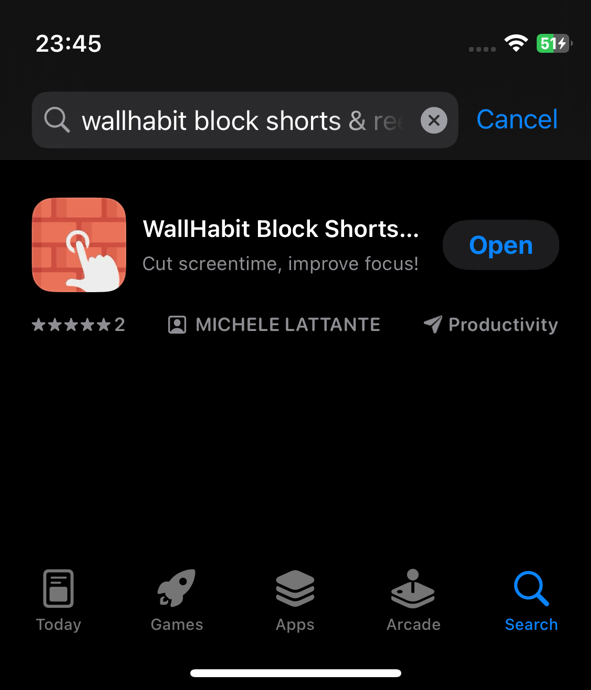
2. Select the right settings to stop reels from appearing.
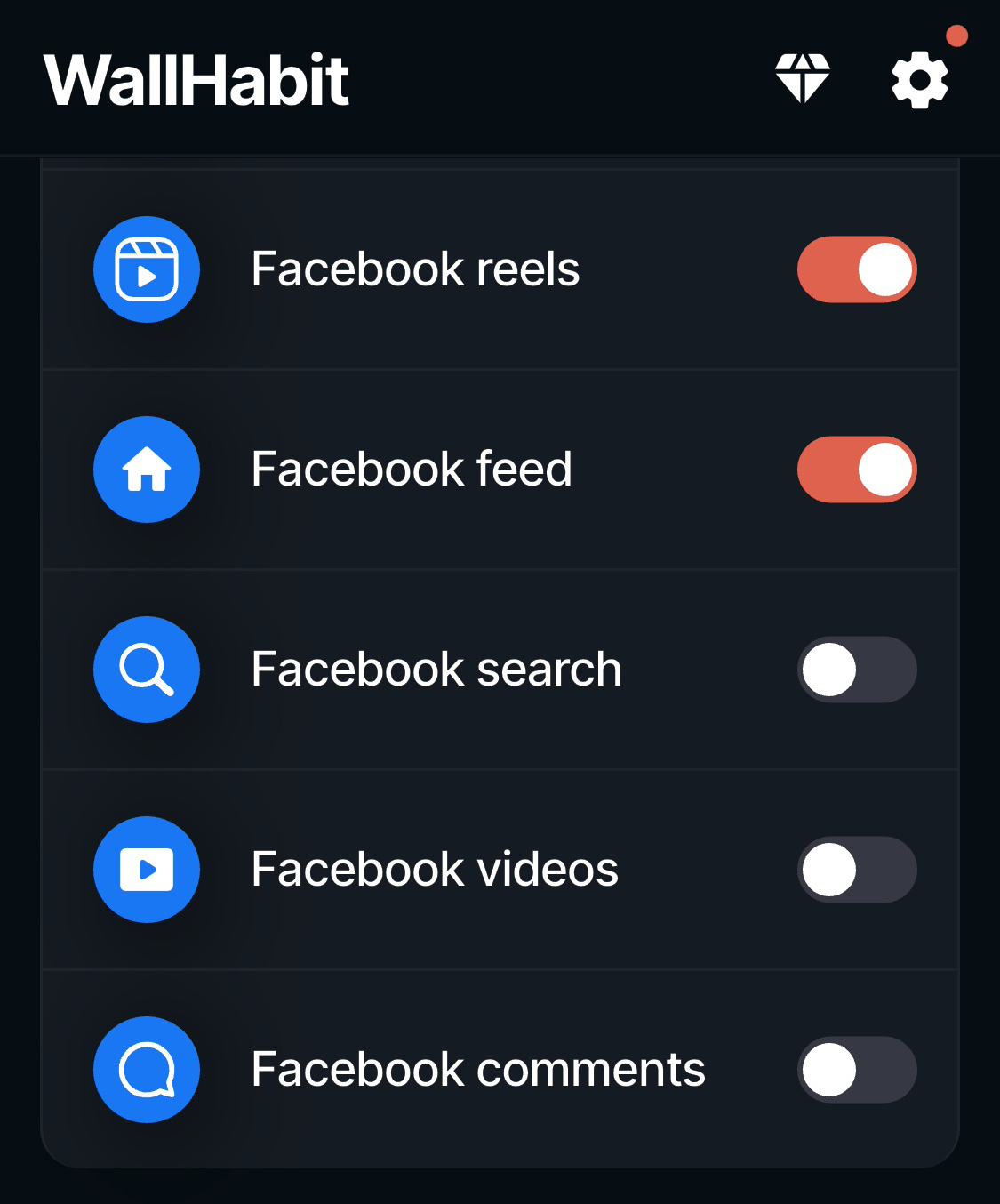
3. Set up the Distraction-Free version to block reels from facebook.
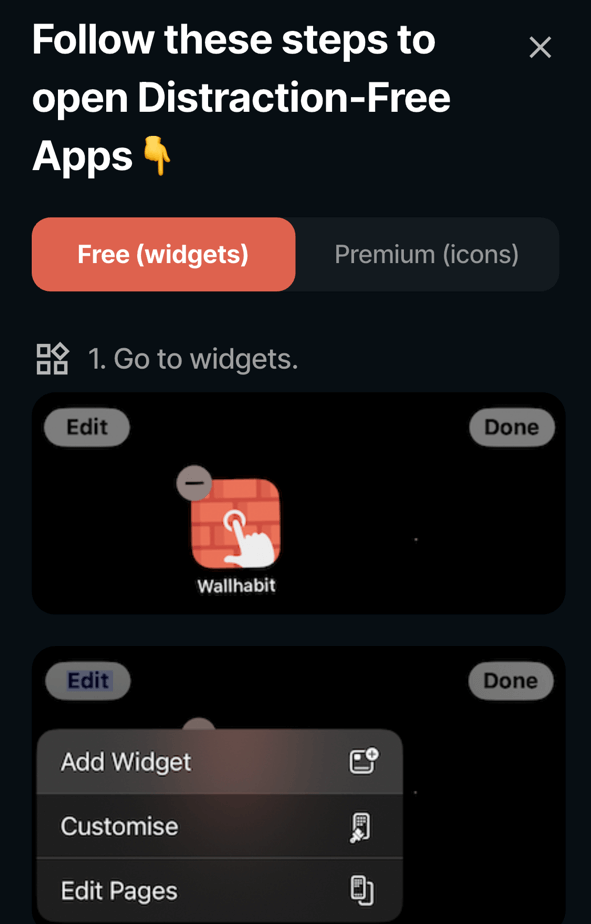
4. Enjoy a clean facebook feed free from every single reel!

Whether you want to hide reels, block reels, or just remove reels, take control today. You can finally use facebook safely and prevent reels on facebook using WallHabit. Stop asking how to get rid of reels on facebook or get rid of facebook reels—fix it now. Don’t let the algorithm decide when you watch reels from your facebook feed. Disable the trap, remove the distraction, and reclaim your facebook time!
Frequently Asked Questions
Is there a way to disable reels on iPhone?
Because the Facebook app is meticulously designed to keep you scrolling, there is no official setting to natively disable reels on your iPhone. However, you can achieve a distraction-free experience by using a commitment device like WallHabit. WallHabit provides a flexible approach: you can use its Distraction-Free environment for your daily Facebook browsing, which completely removes the reels feed from your screen. For those rare moments when you absolutely need the native app, you can keep it securely locked behind WallHabit’s “Tap to unlock” challenge—requiring you to physically tap the screen hundreds of times without stopping just to open it—ensuring you don’t fall back into bad habits.
Can I turn off reels on Facebook on iPhone?
You cannot turn off reels directly within the Facebook app on an iPhone, as Meta’s business model relies on pushing short-form videos to your feed. The most effective way to turn them off is by using WallHabit. By adopting WallHabit’s Distraction-Free version of Facebook, the reels section is entirely hidden, allowing you to check updates from friends and family without the algorithm hijacking your attention. This approach lets you maintain a healthy relationship with social media, keeping the addictive native app locked away behind a rigorous tapping challenge for emergencies only.